
Showing posts with label 3D animation. Show all posts
Showing posts with label 3D animation. Show all posts
April 28, 2014
I'm taking another 3D animation course...
This time it's with Animsquad! I'm onto week 2 of 12. I am getting a little bit burned out since I've been doing this since January. But I'm learning a lot! I'll finish up this course in early July and hopefully I'll have a couple of nice show pieces. Here's a taste of my first shot work in progress:


March 24, 2014
iAnimate workshop, only two weeks left...
For the past 12 weeks I've been taking an iAnimate workshop. I've got 2 weeks left to go. The focus is body mechanics. At this point I am much more comfortable animating in Maya. I'm far braver manipulating the graph editor. I find it difficult to get all the assignments to a satisfactory point of polish while also working a full time job. I'll get there, just not when the official deadline comes around. It's fun though and challenging. Like animation bootcamp. I would suggest this course to anyone looking to dig into a great 3D animation course.
It's actually pretty fantastic to learn how to animate with 3D because you can move the camera around and see exactly what is right and wrong with a shot. Tweaking the curves in the graph editor is an education. I still think learning with 2D hand drawn animation is absolutely very helpful, but it seems to me that practising your animation skills in both mediums is quite beneficial.
Here's a screenshot of my walk to run assignment in progress:

As soon as this course ends I'm going to hop into another animation course, this time with Animsquad. It looks like a great workshop. I signed up for the Intermediate course and I think the amount of work and level of intensity is going to be even higher than I'm experiencing with iAnimate. I'm scared and excited about that.
It's actually pretty fantastic to learn how to animate with 3D because you can move the camera around and see exactly what is right and wrong with a shot. Tweaking the curves in the graph editor is an education. I still think learning with 2D hand drawn animation is absolutely very helpful, but it seems to me that practising your animation skills in both mediums is quite beneficial.
Here's a screenshot of my walk to run assignment in progress:
As soon as this course ends I'm going to hop into another animation course, this time with Animsquad. It looks like a great workshop. I signed up for the Intermediate course and I think the amount of work and level of intensity is going to be even higher than I'm experiencing with iAnimate. I'm scared and excited about that.
October 11, 2013
Animation Staycation Finale
My staycation to learn more about animating in Maya and put together an animated show piece has ended, but my work on said show piece is still very much in progress.
I took the last Friday and Monday off in September this year to use as my last Staycation days. That gave me a second long weekend to research and animate a shot in Maya. Over the course of this weekend I doubted my first idea and came up with two entirely new ideas! I spent time researching these ideas and even started to animate one of them. When I went back to work that week and stepped away from the whole experience I ended up deciding to go back to idea #1. (This is the scene of a man chasing a squirrel up a tree.) Sadly, I couldn't get the Gunter rig I was using to cooperate with me. I love it's design and really wanted to use it, but it wasn't working out. So I switched over to the Malcolm rig and ended up learning how to use a rig picker which is awesome! AnimSchool created this picker for it's custom Malcolm rig and you can even make you own buttons. So I made a whole set of buttons for the Squirrelly rig I'm using too which is excellent. I just know there must be a few ways to work more efficiently than I currently am and I just don't know what they are yet. I've picked up a few great tips and shortcuts so far and using the picker is a fantastic new tool for me to use. It lets me animate faster and easier.
The climbing piece that I've decided to animate had to take a couple steps back before I could move forward. One fellow animator I showed the animatic (leica) to felt that the first camera move crossed the axis line. While I think that's up for debate since I believed the transition was clear, I sure don't want anyone who watches this piece to get hung up on something like that. So I had to pick a new camera angle for the first scene of the shot and it gave me the exciting opportunity to get some more squirrel screen time in. Happy accident! So I had to storyboard and thumbnail poses for that. And then, because I had switched to a new rig for the human, I had to start the animation over for that guy and consider tweaks to his personality since it's a completely different character.
Here are some of the pose thumbnails I did for the squirrel. They're super scribbly and rough but they're enough for me to get started. I like being able to get broad ideas out quickly and clearly. I refine my ideas from the point of brainstorm.
 Here's my animatic so far! It's only the first scene of the shot. I've already got a pile of fantastic revision notes from my best critique resource! It's pretty awesome to have someone like that, that you can show work to and get a really honest and helpful critique.
 I'll share more when I have more to show!
I took the last Friday and Monday off in September this year to use as my last Staycation days. That gave me a second long weekend to research and animate a shot in Maya. Over the course of this weekend I doubted my first idea and came up with two entirely new ideas! I spent time researching these ideas and even started to animate one of them. When I went back to work that week and stepped away from the whole experience I ended up deciding to go back to idea #1. (This is the scene of a man chasing a squirrel up a tree.) Sadly, I couldn't get the Gunter rig I was using to cooperate with me. I love it's design and really wanted to use it, but it wasn't working out. So I switched over to the Malcolm rig and ended up learning how to use a rig picker which is awesome! AnimSchool created this picker for it's custom Malcolm rig and you can even make you own buttons. So I made a whole set of buttons for the Squirrelly rig I'm using too which is excellent. I just know there must be a few ways to work more efficiently than I currently am and I just don't know what they are yet. I've picked up a few great tips and shortcuts so far and using the picker is a fantastic new tool for me to use. It lets me animate faster and easier.
The climbing piece that I've decided to animate had to take a couple steps back before I could move forward. One fellow animator I showed the animatic (leica) to felt that the first camera move crossed the axis line. While I think that's up for debate since I believed the transition was clear, I sure don't want anyone who watches this piece to get hung up on something like that. So I had to pick a new camera angle for the first scene of the shot and it gave me the exciting opportunity to get some more squirrel screen time in. Happy accident! So I had to storyboard and thumbnail poses for that. And then, because I had switched to a new rig for the human, I had to start the animation over for that guy and consider tweaks to his personality since it's a completely different character.
Here are some of the pose thumbnails I did for the squirrel. They're super scribbly and rough but they're enough for me to get started. I like being able to get broad ideas out quickly and clearly. I refine my ideas from the point of brainstorm.

Subscribe to:
Posts (Atom)
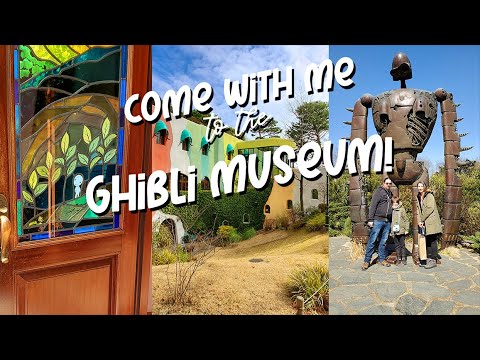
Come with me to the Ghibli Museum!
I made a video for my youtube channel about my visit to the Ghibli Museum this past March.
-
 I've been using Toonboom to animate scene 10 of my short film. I'm creating hand drawn animation for this scene, but doing it fully ...
 -
 I had a recent question over Twitter from John Lechner about workflow in Toonboom. He was interested in learning about my workflow in Toonbo...